Scan Receipts. Process Payments Instantly.

Capture receipts, manage expenses, streamline approvals and track reimbursements — all from one simple platform.

Our goal is to provide a yet powerful expense management solution that helps businesses and individuals manage expenses effortlessly.

Start Tracking Expenses

features img

Our Specialized Features

To use ExpenseJoy, just add, track, and submit. We’ll handle the rest.

From creating expenses to getting reimbursed, everything happens in one place.

No spreadsheets. No chasing. Just faster, smarter expense management.
01

Create & Submit Multiple Expenses

Submit More. Repeat Less.

Got multiple expenses from a business trip, project, or workday? Create them together and submit them as a single expense report.

No need to submit bills one by one. Group related expenses, review them, and send them for approval in just a few clicks.

  • Create multiple expenses at once
  • Group expenses by trip, project, or month
  • Submit expenses as one report
  • Review expenses before submission
  • Faster approval and reimbursement
02

Receipt Upload with Smart OCR

Upload a Receipt. Let ExpenseJoy Do the Data Entry.

Skip manual entry of vendor names, amounts, dates, and GST details. Simply upload your receipt from desktop, and ExpenseJoy automatically extracts the important expense details in seconds.

Review the details, make any changes if needed, and save your expense with just a few clicks.

  • Upload receipts from mobile or desktop
  • Automatically capture vendor details
  • Auto-fill amount and date
  • Capture GST information
  • Reduce manual data entry
  • Edit extracted details easily
03

Reported & Unreported Expenses

Never Lose Track of an Expense

Know exactly which expenses have been submitted and which ones are still waiting to be reported.

Keep pending expenses visible so nothing gets forgotten during month-end closing.

  • Reported / Unreported expense views
  • Pending expense visibility
  • Filter by employee and date
  • Easy expense tracking
  • Helps prevent missed submissions
04

Streamline Expense Approvals

Put Every Expense Through the Right Approval Process

Create a structured workflow to submit, review, and approve expenses with the right people involved at each stage.

Keep employees, managers, and finance teams connected with clear expense status and a smooth approval process from submission to final decision.

  • Expense submission
  • Approval-based workflow
  • Approver notifications
  • Submitter notifications
  • Expense status tracking
05

Payments & Reimbursements

From Approved Expense to Final Settlement

Once an expense is approved, keep the payment and reimbursement process organized.

ExpenseJoy helps teams track what has been settled, what is pending, and what still needs attention.

  • Employee reimbursements
  • Payment settlement
  • Reimbursement tracking
  • Advance payments
  • Settlement records
  • Payment status visibility
06

Split & Merge Expenses

Handle Shared Expenses with Ease

Not every expense belongs to one person, category, or project.

Split a single expense across multiple users or projects, or merge duplicate expenses to keep your records clean and organized.

  • Split expenses equally
  • Split by custom amount
  • Assign expenses to different users
  • Allocate expenses across projects
  • Merge duplicate expenses
07

External Reports & Insights

Understand Where Your Money Goes

Expense tracking is more than recording numbers.

ExpenseJoy helps turn your expense data into useful insights so you can understand spending patterns, identify trends, and make better business decisions.

  • Category-based reports
  • Merchant-based reports
  • Assign expenses to different users
  • Expense history
  • Downloadable reports
  • Clear spending visibility

Built for Everyone — From Interns to Finance Teams.

Simple workflows, less manual work, and better visibility — everything your business needs to manage expenses efficiently.

01

User Friendly

Built for Everyone — From Interns to CFOs.

ExpenseJoy keeps expense management simple with an intuitive interface and straightforward workflows.

No complicated training. No confusing processes.

Just create, submit, approve, and track expenses with ease.

02

Automation

Let ExpenseJoy Handle the Repetitive Work.

Reduce the time spent on manual expense tasks.

From receipt data capture and reminders to approval workflows and reporting, ExpenseJoy helps automate repetitive processes.

Spend less time managing bills and more time focusing on your business.

03

Scalability

Built to Grow With Your Business.

Whether you're managing a small team or a growing organization, ExpenseJoy is designed to adapt as your needs change.

Add teams, manage approval workflows, and organize expenses as your business grows.

One Platform. Complete Expense Management.

Track Every Expense. Simplify Every Approval.

From capturing receipts to approving expenses, managing reimbursements and generating reports, ExpenseJoy brings the complete expense management process together in one simple platform.

Less Manual Work. More Visibility. Better Control.

Get Started with ExpenseJoy

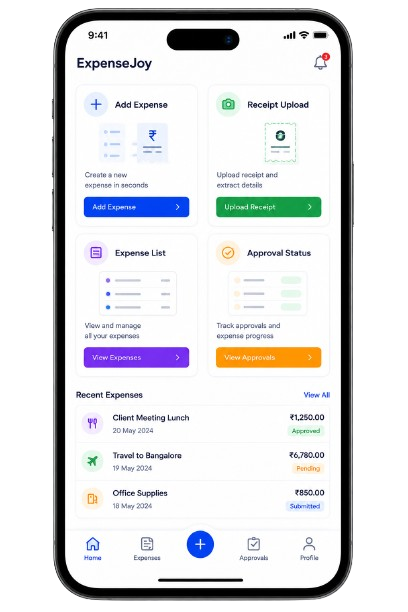
Manage Expenses Wherever You Go

Expense Management, Right at Your Fingertips

Stay connected to your expenses wherever work takes you.

ExpenseJoy is designed to make expense management simple, flexible, and accessible — whether you're in the office, travelling, meeting clients, or working remotely.

With the upcoming Android and iOS apps, you’ll be able to create expenses, capture receipts, check expense status, and stay updated on approvals and reimbursements directly from your mobile device.

Coming Soon on Android & iOS

Explore ExpenseJoy
ExpenseJoy mobile app phone mockups

Frequently Asked Questions?

Yes. You can create multiple expenses and group them into a single report for easier submission and approval.

Simply upload a receipt and ExpenseJoy can automatically capture important details such as vendor, amount, date, and GST information. You can review and edit the details before submitting.

Yes. Employees can create and submit expenses, while designated approvers can review and approve or reject them.

Yes. ExpenseJoy helps you identify expenses that have been saved but not yet submitted, making it easier to ensure nothing gets missed.

Yes. You can split expenses by employee, project, category, or custom amounts based on your business requirements.

Yes. ExpenseJoy provides organized reports and spending insights to help you understand where your money is going.

Yes. You can use ExpenseJoy to manage travel-related expenses, employee trips, client visits, sales travel, and field expenses.